Download Data Recovery Pro
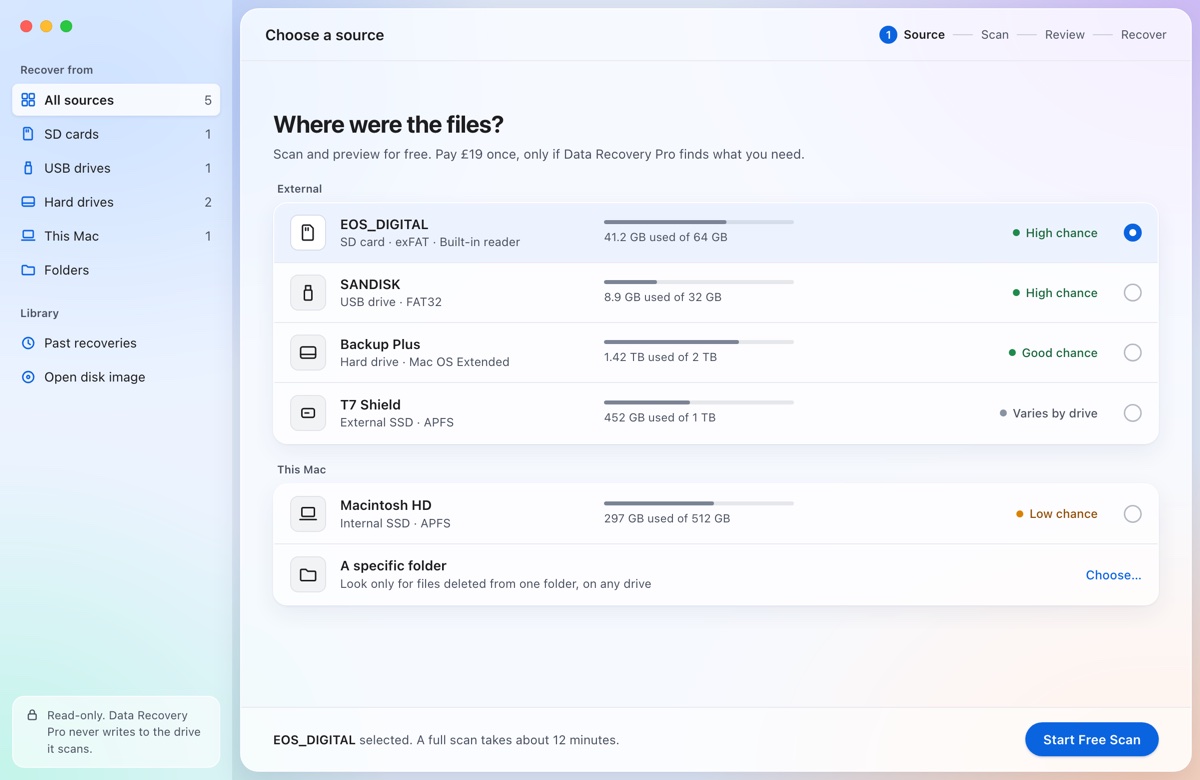
Install it, plug in the card, and let it get to work. Scanning and previewing are free; you pay £19 per card only when you want the photos back.
Download for MacmacOS 13 or later · Apple silicon and Intel · Signed and notarised by Apple
Install it on your Mac, not on the card. Anything saved to the card you want to recover from can overwrite the deleted files.
What happens next
- Open the download and drag the app to ApplicationsThen open Data Recovery Pro from Applications.
- Plug in the card or USB driveIt appears in the list with its format and a chance rating. If macOS offers to initialise it, click Ignore.
- Enter your Mac's password oncemacOS asks before any app can read a card directly. The app's reader opens the card read-only and stops when you quit.
- Scan and preview, freeDeleted files appear with their names where the card's file table survives; the deep scan finds photos and video after a format.
- RecoverThe first 10 files or 100 MB are free. For the rest, pay £19 once for that drive. Files are saved to your Mac, never back to the card.
Requirements
| Mac | macOS 13 Ventura or later, Apple silicon or Intel. |
|---|---|
| Cards and drives | SD, microSD and CF cards and USB drives. Names and folders are kept on FAT16, FAT32 and exFAT; the deep scan works on any format. |
| Not in version 1 | The Mac's own internal drive, and Windows or Linux. |